Social media management often involves repetitive tasks, from logging into accounts and updating profiles to publishing content and managing daily interactions. Performing these tasks manually across multiple accounts can take time and effort.
TikSales AI Automation helps simplify these workflows by automating repetitive social media tasks through ready-to-use templates, customizable RPA templates, and API integrations for AI agents. Instead of completing every action manually, you can configure an automation workflow, set the required parameters, and let cloud phone environments in TikSales handle the execution.
In this guide, we'll explore what AI Automation in TikSales is, how it works, and how you can use it to streamline your social media operations.
What Is AI Automation in TikSales?
AI Automation in TikSales is an automation solution designed to help users execute repetitive tasks across supported social media apps and cloud phone environments.
It offers three main capabilities:
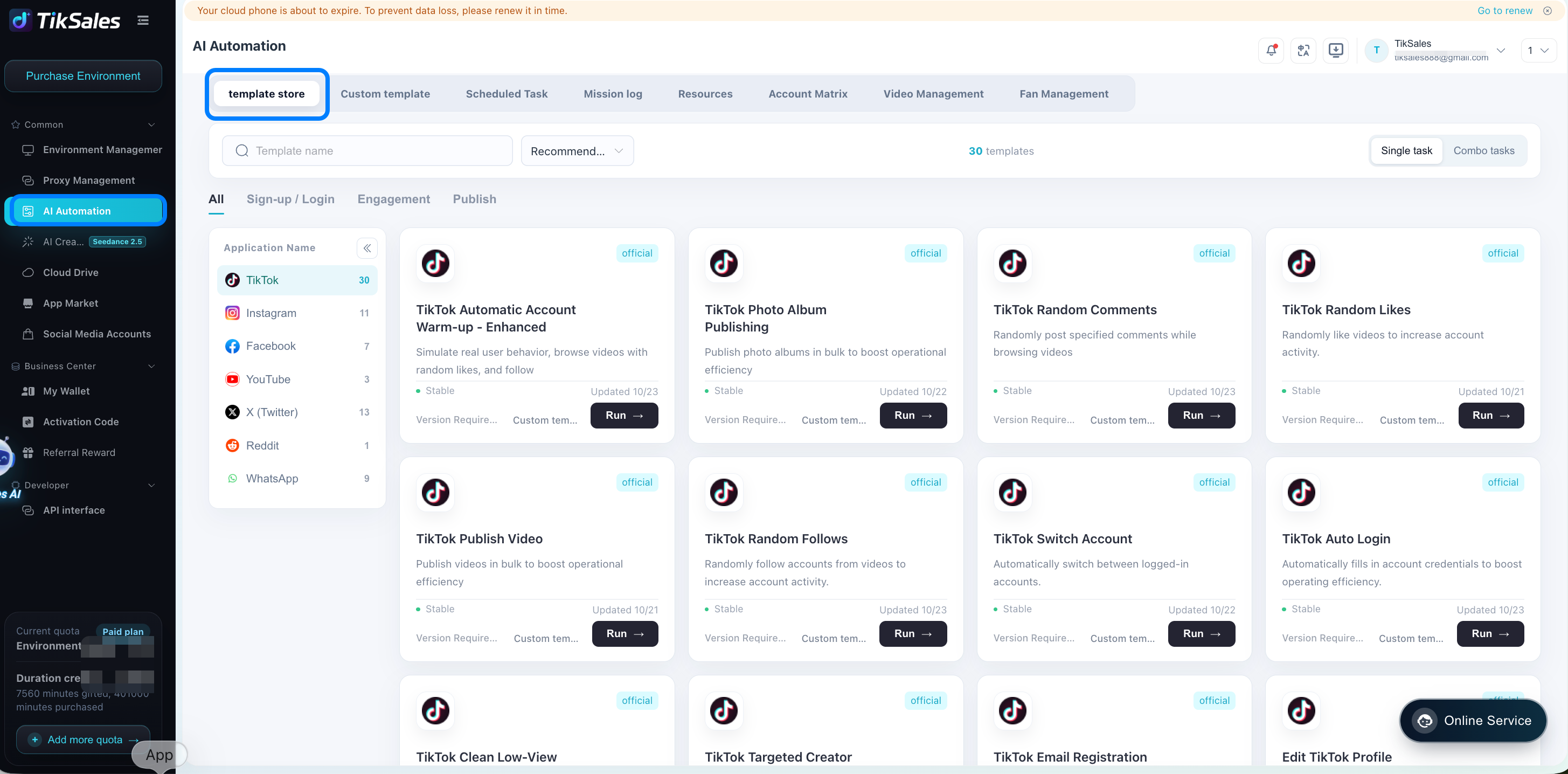
- Ready-to-use automation templates: Run prebuilt workflows for common social media tasks without writing code.
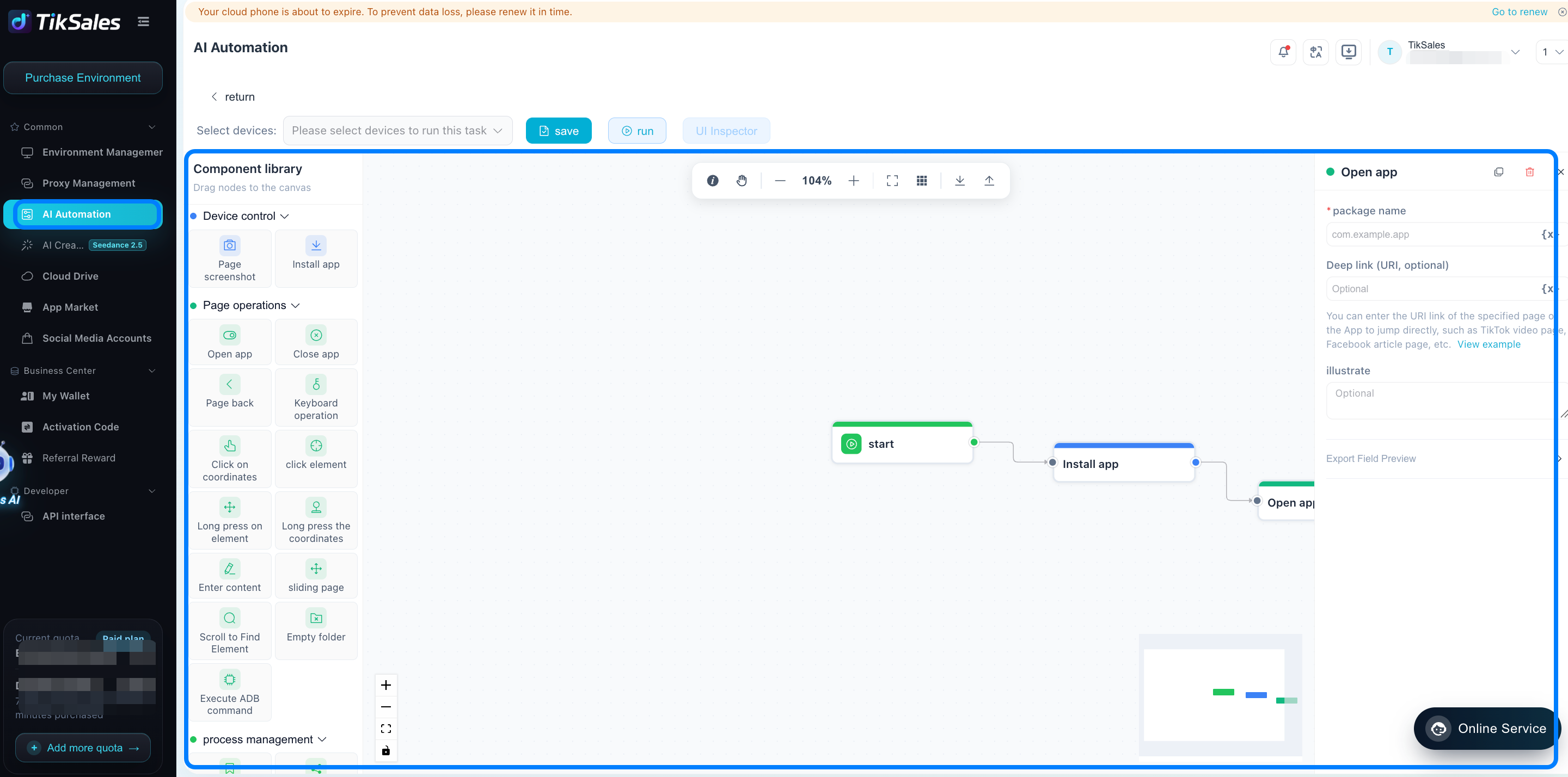
- Custom RPA templates: Build personalized automation workflows using components, code scripts, API requests, and HTTP requests.
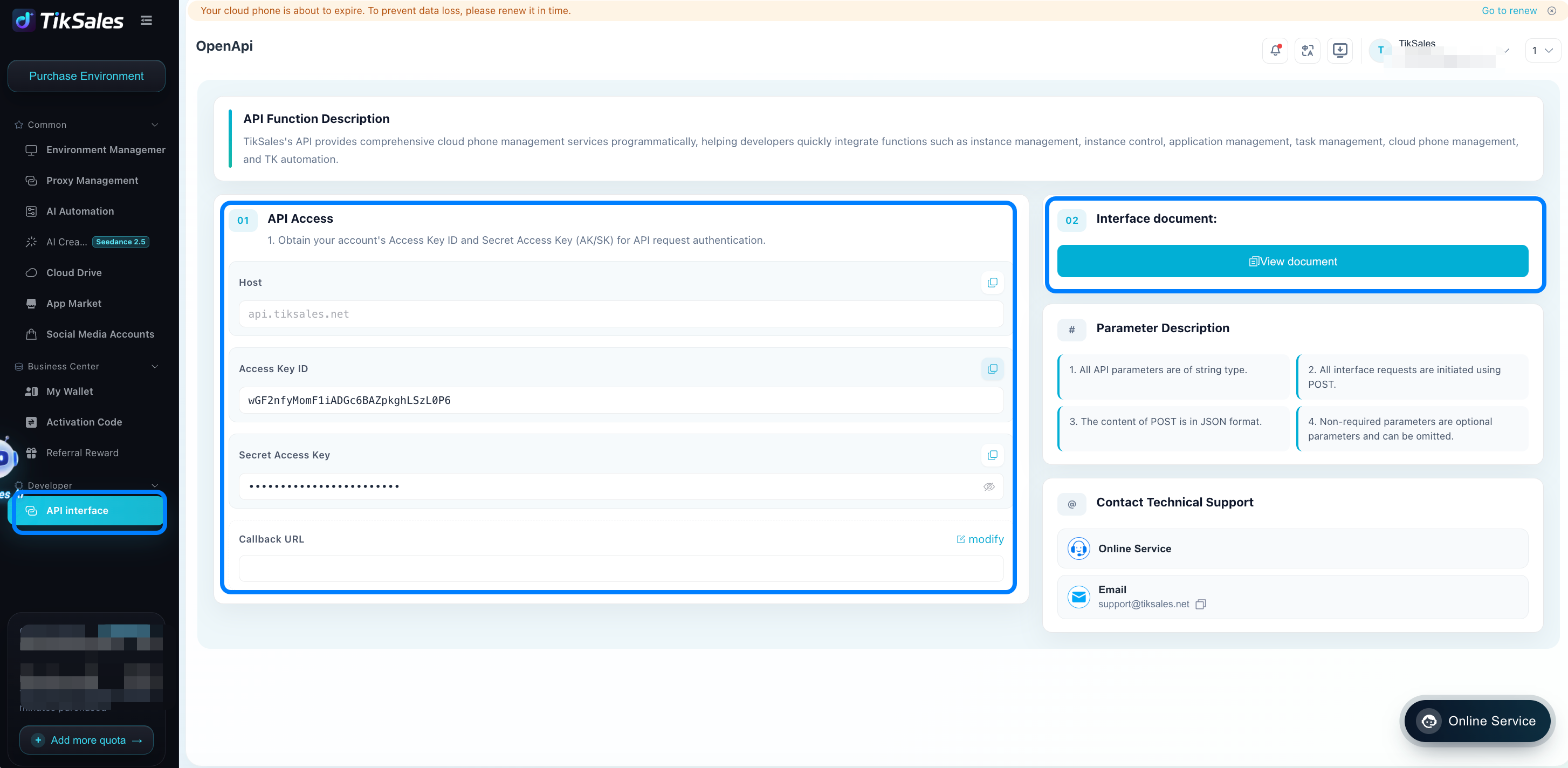
- API integration for AI agents: Connect TikSales with AI agent coding workflows through API interfaces to support more flexible automation.
Whether you manage multiple social media accounts, maintain account activity, or need to automate routine operations, TikSales provides flexible ways to build and execute workflows based on your needs.
What Can You Automate with TikSales AI Automation?
TikSales supports a range of automation scenarios for everyday social media operations.
1. Account Login
Automate register or routine login procedures for supported social media apps. This can help streamline account setup and recurring account operations.
2. Profile Editing
Automate profile-related tasks, such as updating supported profile fields and other account information, based on the selected template.
3. Account Warm-Up
Use automation workflows to carry out routine account activities and account maintenance processes more consistently.
4. Social Media Interactions
Automate supported interaction tasks, including randomized follows, likes, and other engagement actions.
Depending on the workflow, you can configure relevant parameters to determine how these actions are performed. Use these features in accordance with the applicable platform rules and avoid spam-like or misleading engagement.
5. Content Publishing
Automate supported publishing workflows by configuring the required content and task parameters. This can reduce repetitive manual steps involved in preparing and publishing social media content.
These use cases help make recurring social media operations easier to manage, especially when multiple accounts or workflows are involved.
How Does AI Automation in TikSales Work?
Getting started is straightforward. For ready-to-use automation templates, you can configure and execute a task in just a few steps.
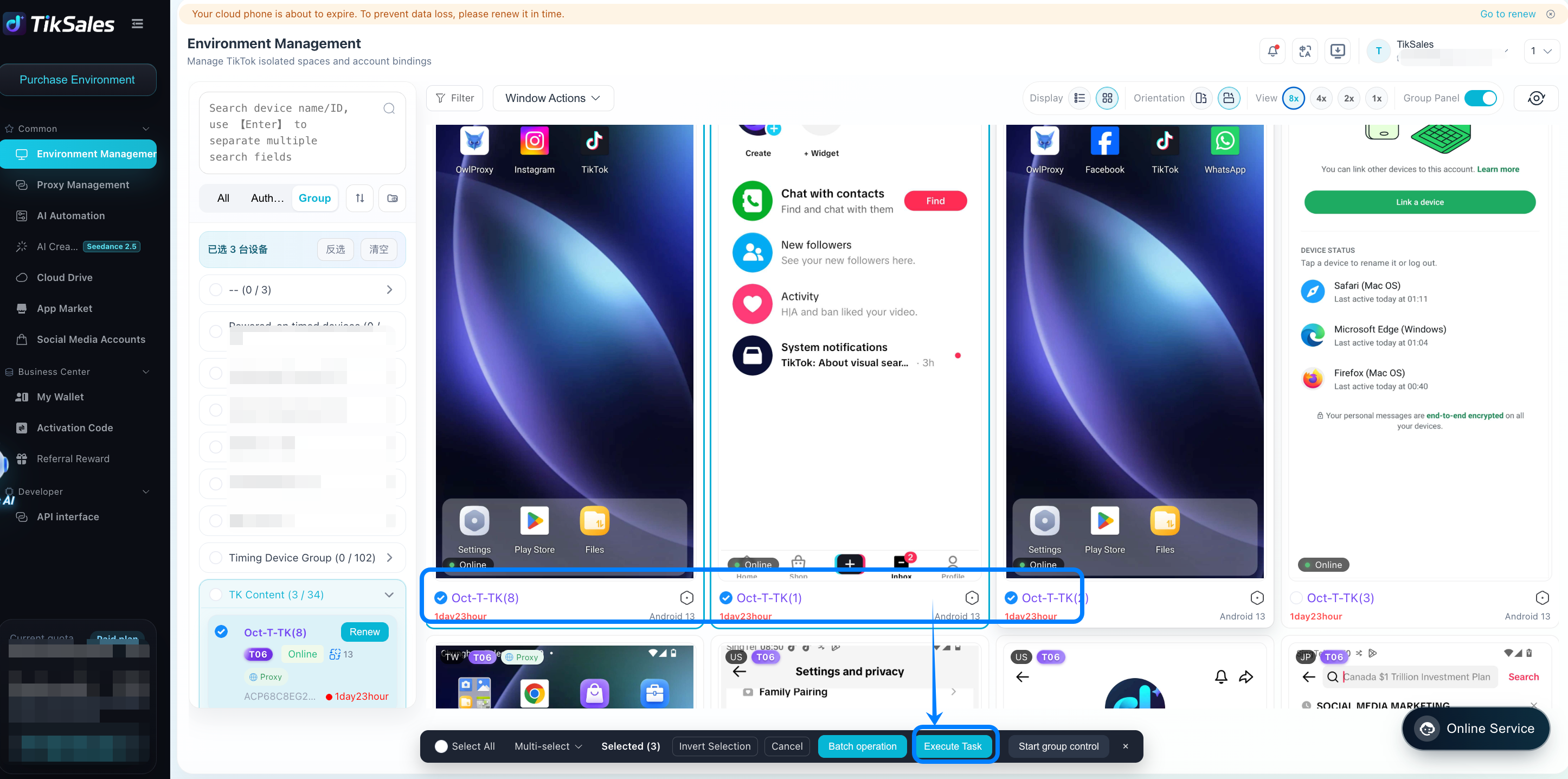
Step 1: Select an Environment
Choose the appropriate cloud phone or supported social media app environment where you want the automation task to run.
Selecting the correct environment was binded with the corresponding proxy helps ensure that the workflow runs in the intended account and app context.
Step 2: Choose the Automation Templates
Browse the available templates and select the one that matches your task.
TikSales provides ready-to-use scripts for common operations, such as logging in, editing profile information, account nurturing, completing social interactions, and publishing content.
Step 3: Customize the Workflow and Enter Parameters
Configure the workflow according to your requirements. Depending on the template, you may need to provide account details, profile information, content, interaction settings, or other task-specific parameters.
You can also customize the workflow when the template supports additional configuration options.
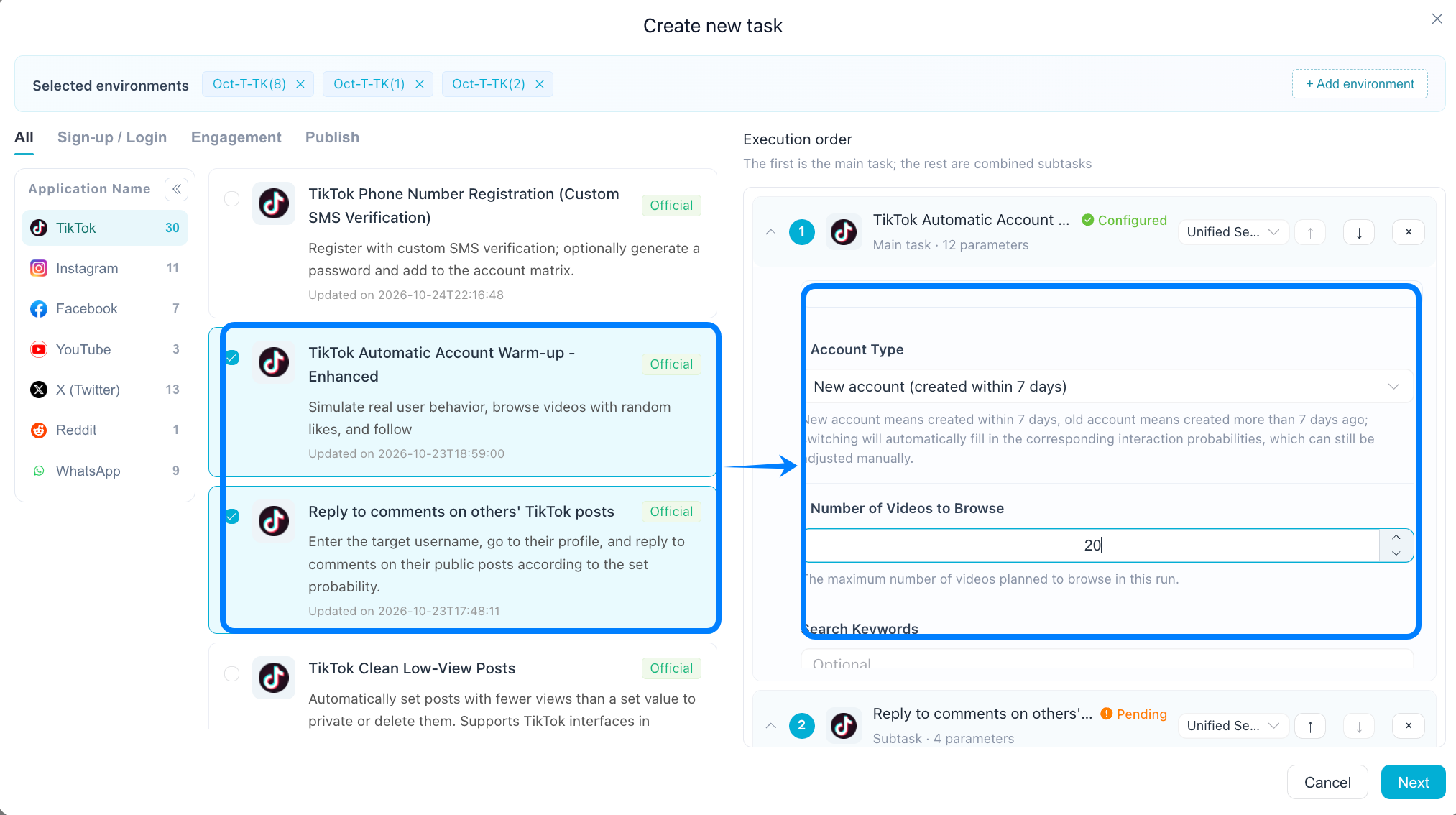
Step 4: Execute the Task
Once you've configured the environment, template, and required parameters, you can execute the task, set it immediately, repeat automatically, or schedule it to run at a specific time.
TikSales executes the automation workflow in the selected cloud phone environment, reducing the need for manual, repetitive actions.
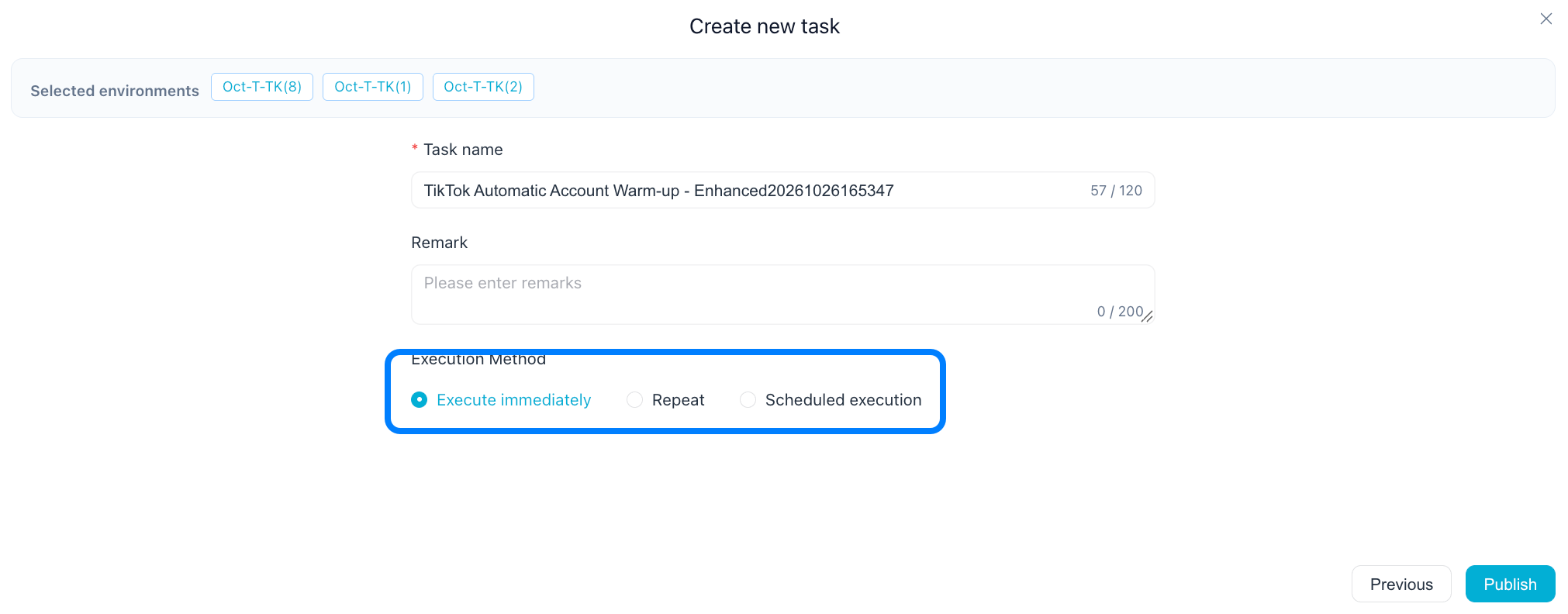
Step 5: Monitor Execution and Review Logs
After execution begins, you can review the task status and logs to understand how the workflow performed.
If a task fails, the logs can help you identify the failure point and troubleshoot the issue before running the task again.
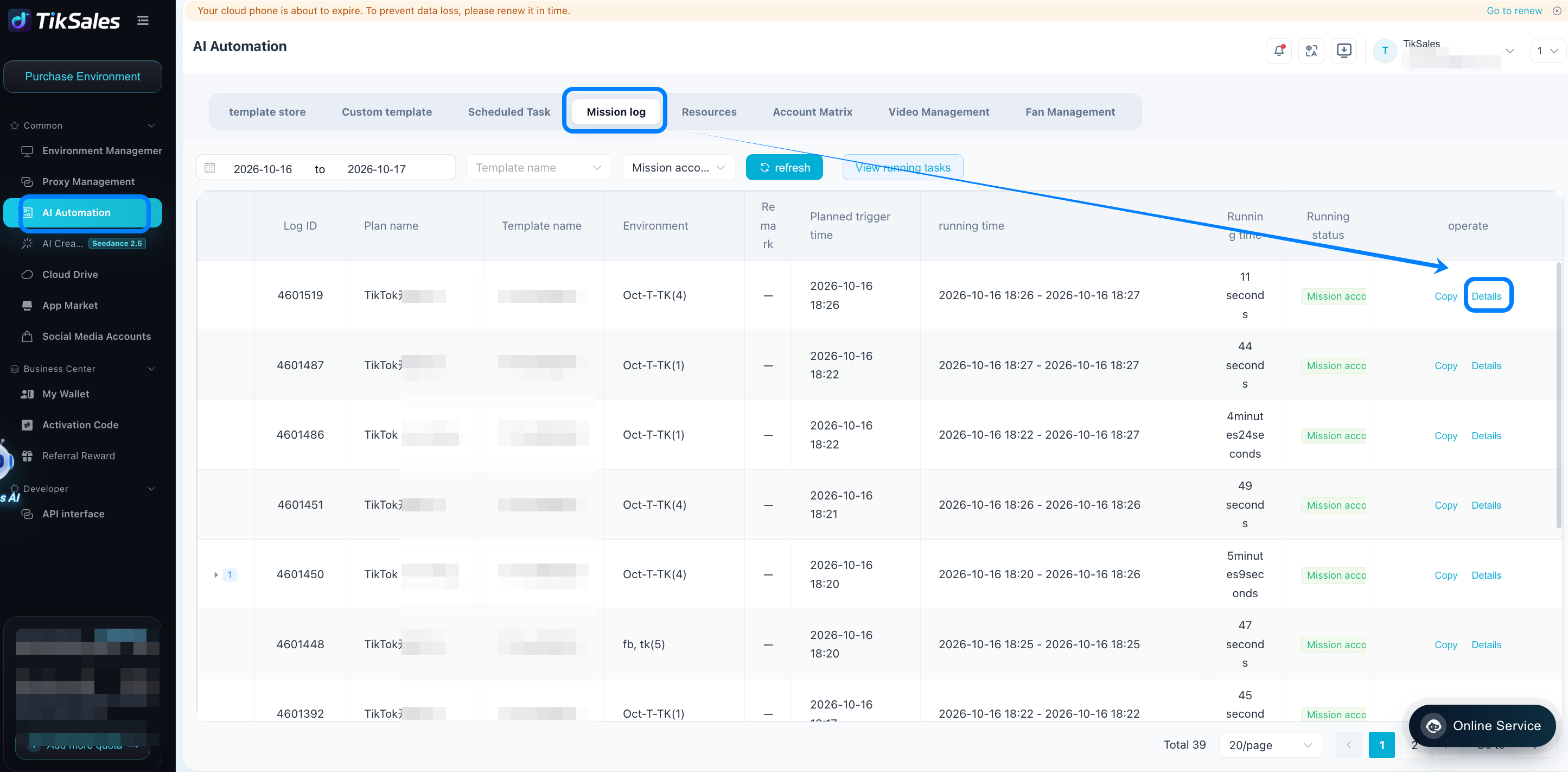
Go Beyond Ready-Made Scripts with Custom RPA Templates
TikSales RPA templates give you the flexibility to customize existing automation workflows or build entirely new ones to meet your specific needs.
Customize Existing Templates
Start with an existing template and tailor it to your requirements. You can add, remove, or modify components to adjust the workflow, making it easy to adapt ready-made automation tasks without building everything from scratch.
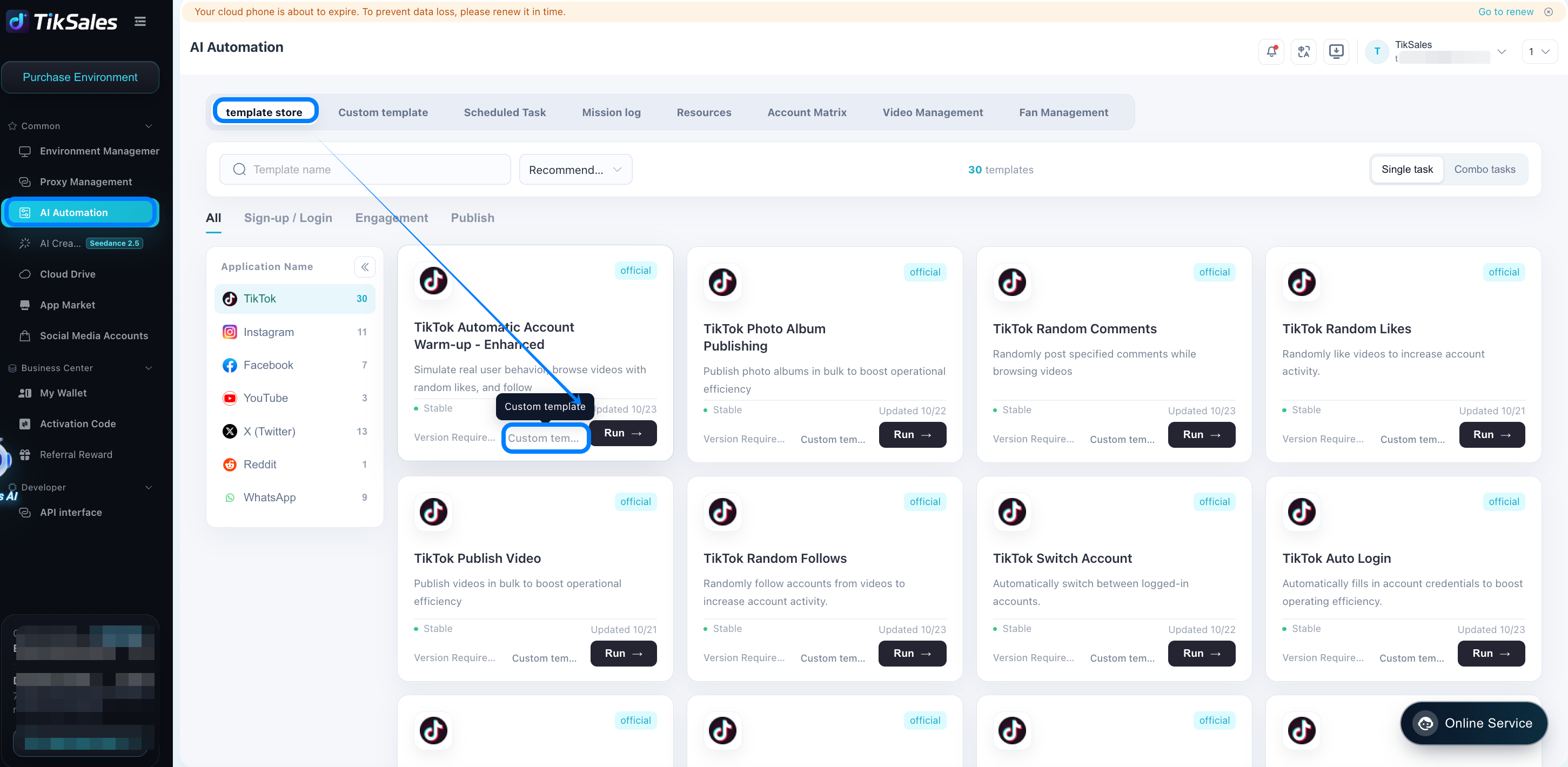
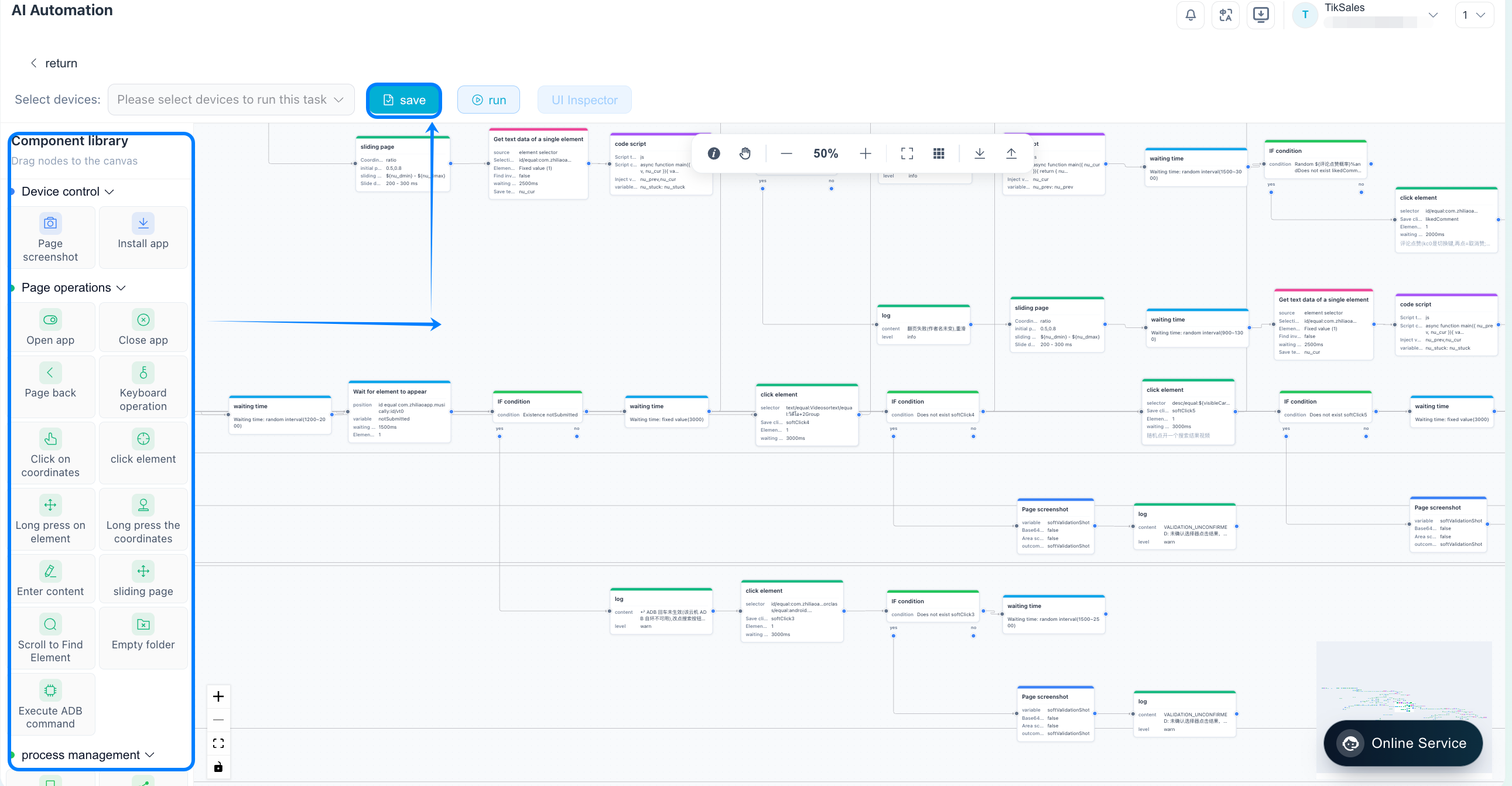
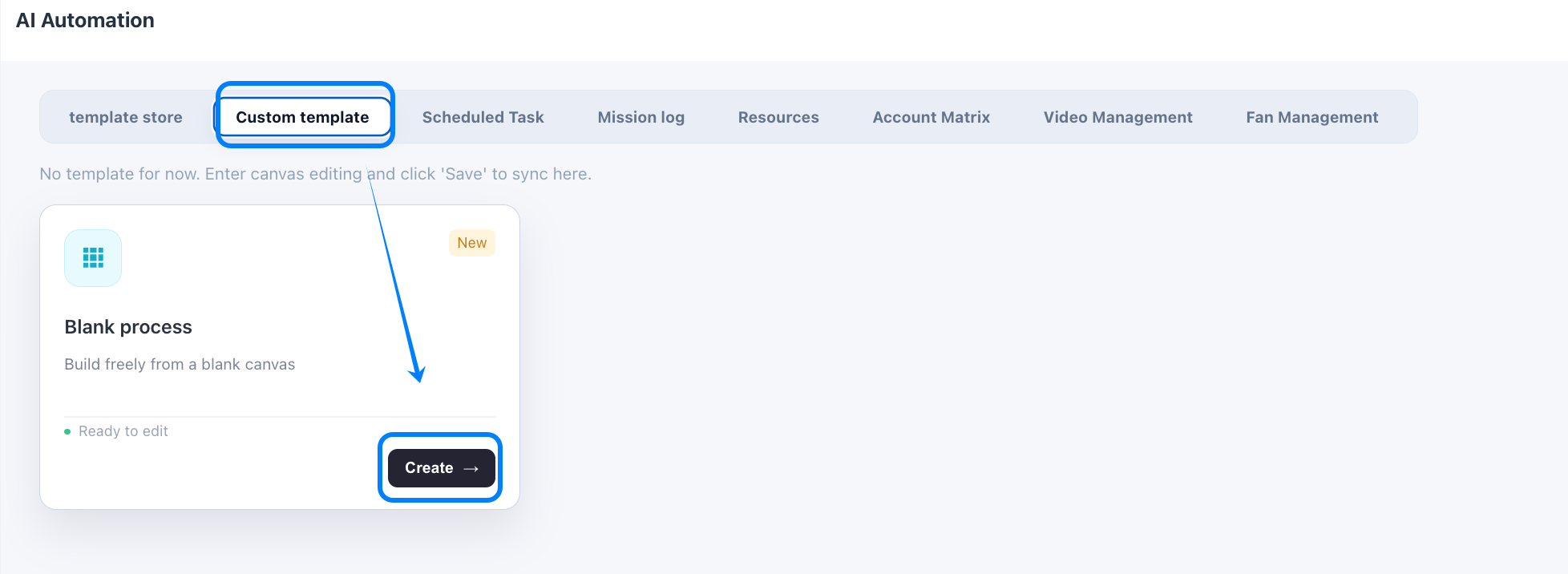
Build Your Own Automation Workflows
You can also create a complete automation workflow from scratch by combining different components to define each step of the process. This allows you to design custom workflows that fit your specific use cases and automation requirements.
Extend Workflows with Code and Requests
For more advanced automation needs, TikSales supports additional components, including:
Code Scripts: Add custom logic and scripting to handle specific operations.
API Requests: Connect with external services through supported API endpoints.
HTTP Requests: Send HTTP requests to interact with web services and integrate external systems.
Whether you're modifying an existing template or building a workflow from the ground up, TikSales RPA templates provide the flexibility to create automation solutions tailored to your needs.
Connect TikSales APIs with AI Agent Coding
For developers and users building AI-powered workflows, TikSales also supports API-based integration with AI agent coding workflows.
By connecting through supported TikSales API interfaces, you can incorporate TikSales capabilities into broader automation systems and development projects.
👉 https://cloud.tiksales.net/tiksales/doc/en/server/OpenAPI.html
This approach can help you build workflows where an AI agent assists with planning, generating, or coordinating automation logic, while TikSales provides the relevant execution environment and automation capabilities.
The exact capabilities depend on the available API endpoints, permissions, and integration requirements.
Why Use AI Automation in TikSales?
TikSales AI Automation helps simplify repetitive social media operations while offering different levels of customization.
- Save time on repetitive tasks. Automate recurring operations instead of manually completing every step.
- Get started without coding. Ready-made templates provide complete scripts for supported tasks, making automation more accessible to non-technical users.
- Customize workflows when needed. Use RPA components, code scripts, API requests, and HTTP requests to create workflows that match your requirements.
- Run tasks in the cloud phone environment. Once a task is configured, execution takes place in the selected cloud phone environment. Your personal computer does not need to remain powered on throughout the task, provided the required cloud phone remains powered on and the task is supported for cloud execution.
Together, these capabilities give users a practical way to move from manual operations to reusable, configurable automation workflows.
FAQs
Is AI Automation in TikSales charge to use?
No. TikSales AI Automation is free to use. You can use the available automation features without paying an additional fee for AI Automation itself. Any separately applicable service limitations or third-party charges, if relevant, should be checked against the current service terms.
Do I need coding skills to use AI Automation?
No. TikSales provides ready-to-use templates with complete automation scripts. Simply select the appropriate environment, choose a template, enter the required parameters, and click to execute the task.
Coding skills are only necessary if you want to create more advanced custom RPA workflows using code scripts or develop integrations through APIs.
Can AI Automation run when my computer is turned off?
Yes. Tasks run in the cloud phone environment, so your personal computer does not need to stay on. As long as the required cloud phone remains powered on, connected, and available for execution, supported automation tasks can continue running without your computer being turned on.
What happens if an automation task fails?
You can check the task logs in TikSales to review execution details and identify where the task failed. Use the information to troubleshoot the issue, adjust the relevant settings if necessary, and run the task again.
If you cannot resolve the problem yourself, contact the TikSales support team for further assistance.
Can I create my own automation workflows?
Yes. TikSales supports custom RPA templates that let you combine automation components to build workflows for specific needs. You can also use code scripts, API requests, and HTTP requests to extend your workflows beyond the functionality of ready-made templates.
Can TikSales AI Automation integrate with AI agents?
Yes. Through supported TikSales API interfaces, you can connect TikSales with AI agent coding workflows and incorporate its capabilities into broader automation projects. The implementation depends on the available APIs and your specific integration requirements.
Get Started with AI Automation in TikSales
Automating social media operations doesn't have to mean building every workflow from scratch.
With TikSales AI Automation, you can start with ready-made scripts, customize your own RPA templates, or connect supported APIs to AI agent coding workflows. From account maintenance and social interactions to publishing and custom integrations, you can choose the automation approach that best fits your needs.