A reliable network connection, consistent IP configuration, and a well-organized account environment are all important parts of a stable TikTok workflow.
TikSales helps users manage TikTok accounts through isolated cloud-phone environments, account management, and automated workflows. It also supports third-party proxy providers, allowing users to connect their existing proxy services rather than relying exclusively on proxies purchased within the platform.
In this guide, we’ll explain how to connect HProxy to TikSales, which proxy types are worth considering for TikTok, how to configure your network environment, and what you can expect to pay for HProxy services.
1. What Proxy Services Can You Use with TikSales?
TikSales supports two main ways to obtain proxy IPs:
- Purchase proxies directly through TikSales: Manage proxy purchasing and environment binding within the platform.
- Connect a third-party proxy provider: Add your existing proxy credentials in TikSales and bind the proxy to your chosen environment.
According to the TikSales proxy configuration guide, third-party proxy settings include the proxy protocol (HTTP/SOCKS5), server address, port, and authentication information. TikSales also identifies residential IPs as an option for bulk account operations.
Why choose HProxy?
According to HProxy’s official guides, HProxy offers residential, mobile, ISP, and datacenter proxies to meet different needs. Its residential network covers 200+ countries, with flexible targeting and sticky session options. HProxy also offers pay-as-you-go pricing, allowing users to choose suitable proxy solutions based on their needs and budget. For TikTok operations, HProxy recommends considering residential proxies for general account management and mobile proxies for mobile-focused workflows.
2. How to Connect HProxy to TikSales
Connecting HProxy to TikSales involves obtaining your proxy credentials, adding the proxy to TikSales, and binding it to the appropriate environment.
Step 1: Choose and configure a proxy in HProxy
Visit the HProxy website and choose a proxy product that matches your requirements.
For TikTok account management, consider the following options:
- Residential proxies: A practical starting point for general account operations.
- Mobile proxies: An option for workflows that benefit from real 4G or 5G carrier IPs.
Proceed to checkout and complete your purchase using one of HProxy’s supported payment methods.
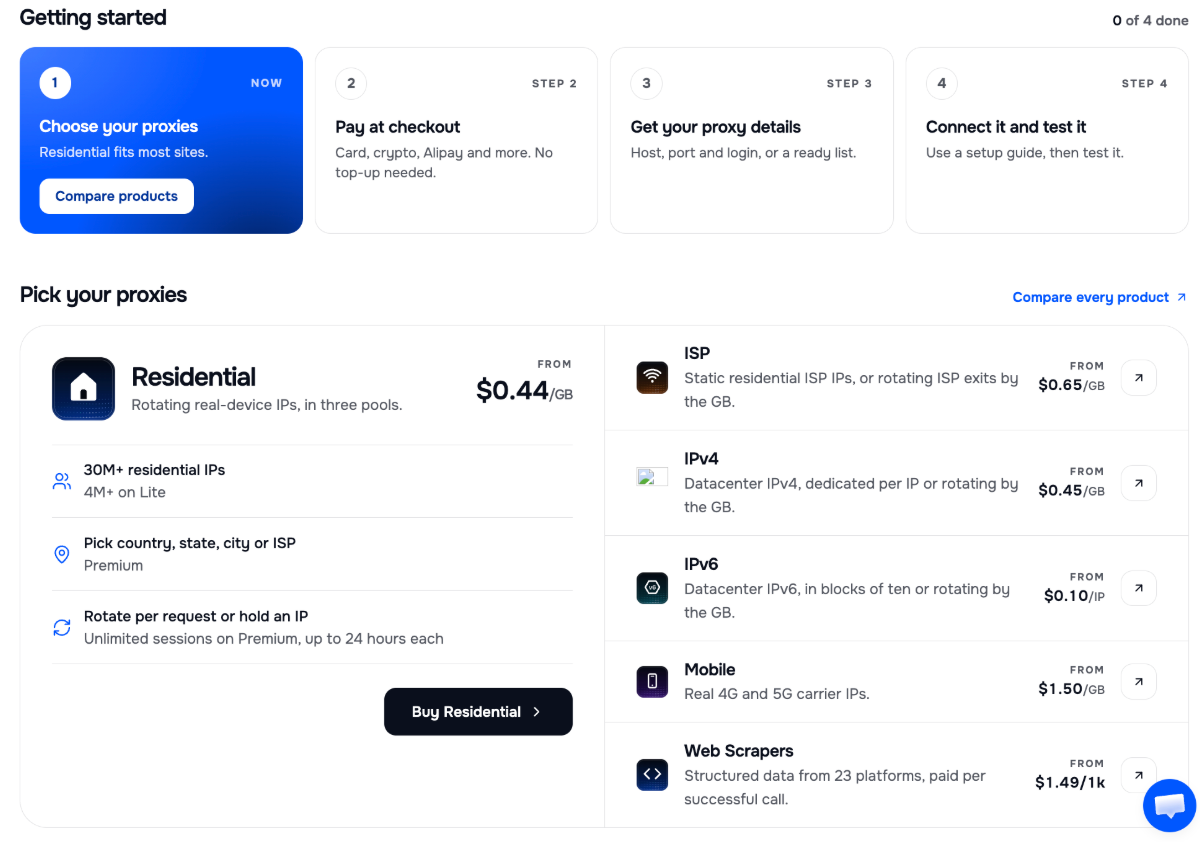
Once your proxy is configured, retrieve the connection details supplied by HProxy. Depending on your selected product, these may include the server address, port, username, password, and supported protocol.
Make sure you use the connection details for your actual proxy product rather than assuming every HProxy plan provides identical connection settings.
Step 2: Open Proxy Management in TikSales
Log in to TikSales and navigate to Proxy Management.
Select Add Proxy to enter your third-party proxy information. TikSales supports HTTP and SOCKS5 proxy configurations.
Enter the required details:
Check each field carefully before saving. The protocol and port must match the credentials supplied by HProxy.
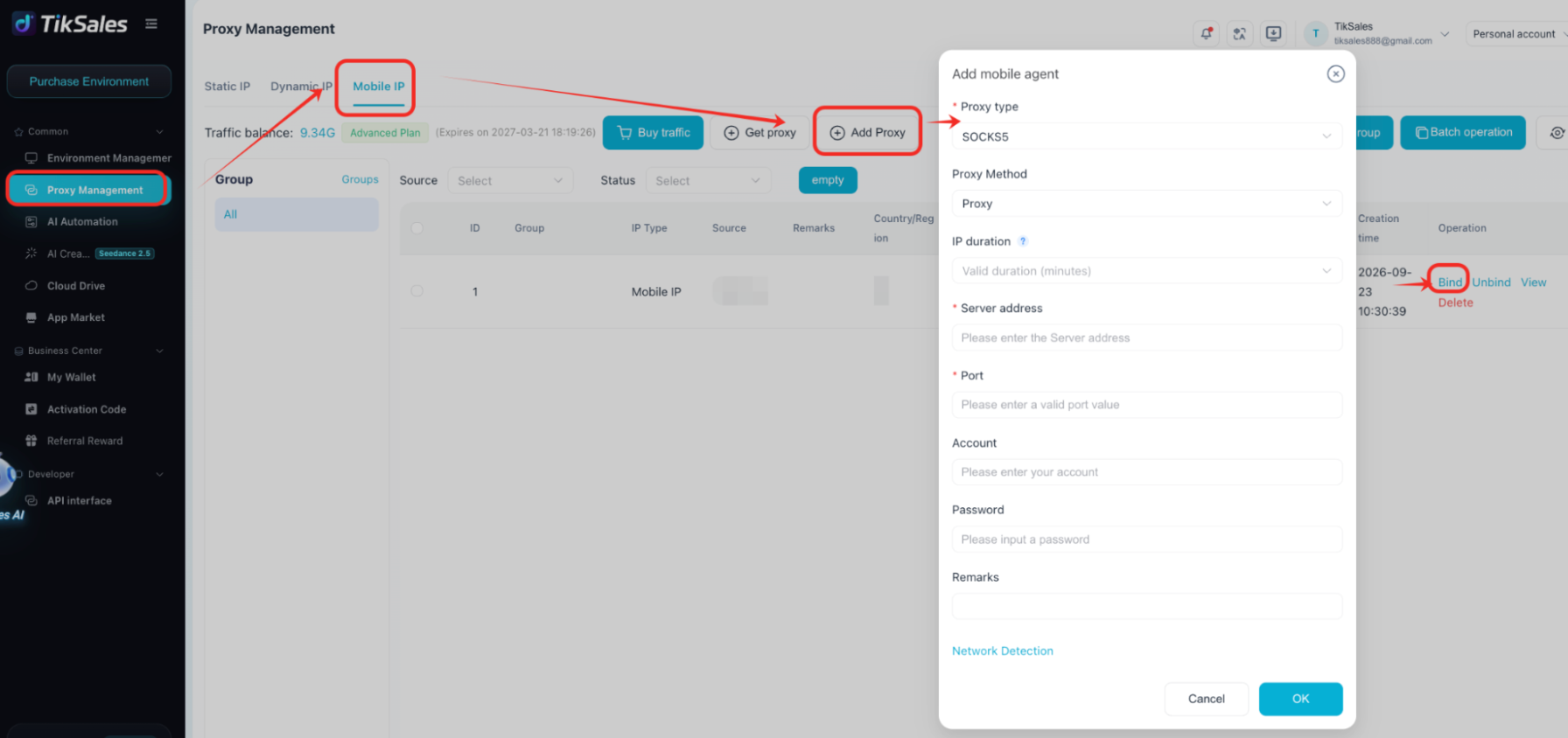
Step 3: Bind the proxy to a TikSales environment
After adding the proxy, to bind a proxy to one environment:
Open Environment Management.
Select the target device.
Click the settings icon in the bottom-right corner.
Select Change Proxy IP.
Choose the HProxy connection you added and complete the binding.
TikSales also supports bulk binding when you need to assign multiple proxies to multiple environments.
For detailed interface instructions, see the official TikSales guide to binding a proxy IP.
3. Which Proxy Type Does HProxy Recommend for TikTok?
The best proxy depends on your workflow, the level of stability required, and your budget.
In its blog article, HProxy explains why free proxies are generally unsuitable for account logins, mobile-app usage, and ongoing automation. Shared datacenter IPs can have poor reputations, unreliable availability, and a higher likelihood of being blocked.
HProxy’s article Social Media Proxies: Run Many Accounts Safely also discusses the differences between residential and mobile proxies.
Here is a practical comparison:
Residential proxies: A practical starting point
Residential proxies route traffic through IP addresses associated with residential internet connections. They can be a suitable choice for routine TikTok operations when the IP is clean, the location is appropriate, and the connection remains consistent.
For a workflow that requires the same IP across multiple sessions, choose a residential product that supports sticky sessions or an appropriate static-IP option.
Keep in mind that residential proxies do not all behave the same way. Some rotate automatically, while others allow you to retain an exit IP for a specified period.
Mobile proxies: An option for mobile-first workflows
Mobile proxies use IP addresses associated with cellular networks, including 4G and 5G connections.
HProxy identifies mobile proxies as a particularly relevant option for TikTok and Instagram because these platforms are mobile-focused and may scrutinize IP reputation closely.
Mobile proxies can be worth testing when residential connections do not provide the reliability you need. However, they cost more, and choosing a mobile IP does not guarantee uninterrupted access or protection against account restrictions.
Why avoid free proxies for important TikTok accounts?
Free proxies can be useful for limited tasks, such as checking how a public page appears from another country without logging in.
However, they may be unstable, shared by many users, or associated with datacenter networks that a platform distrusts. They can also introduce security risks if the operator is untrustworthy.
For accounts that matter to your business, a reputable paid proxy with clear connection details and predictable behavior is a more sensible starting point.
4. HProxy Pricing: How Much Does It Cost?
HProxy uses a pay-as-you-go model for its main proxy products. Residential and mobile proxies are billed by bandwidth, while datacenter and some ISP products use per-IP pricing.
The following starting prices are listed on the official HProxy pricing page.