TikSales PC Client Download Guide
更新于 2026-08-27
Q1: Which operating systems does TikSales support?
TikSales currently supports the following desktop clients:
Windows
macOS
ARM64
x64
Linux
Please select the appropriate version based on your computer’s operating system and processor architecture.
Q2: How do I download the TikSales Mac client?
Check your Mac chip: Click → About This Mac and check the chip information.
Apple M1 / M2 / M3 / M4, etc. → ARM64
Intel → x64
Find the macOS client on the TikSales download page.
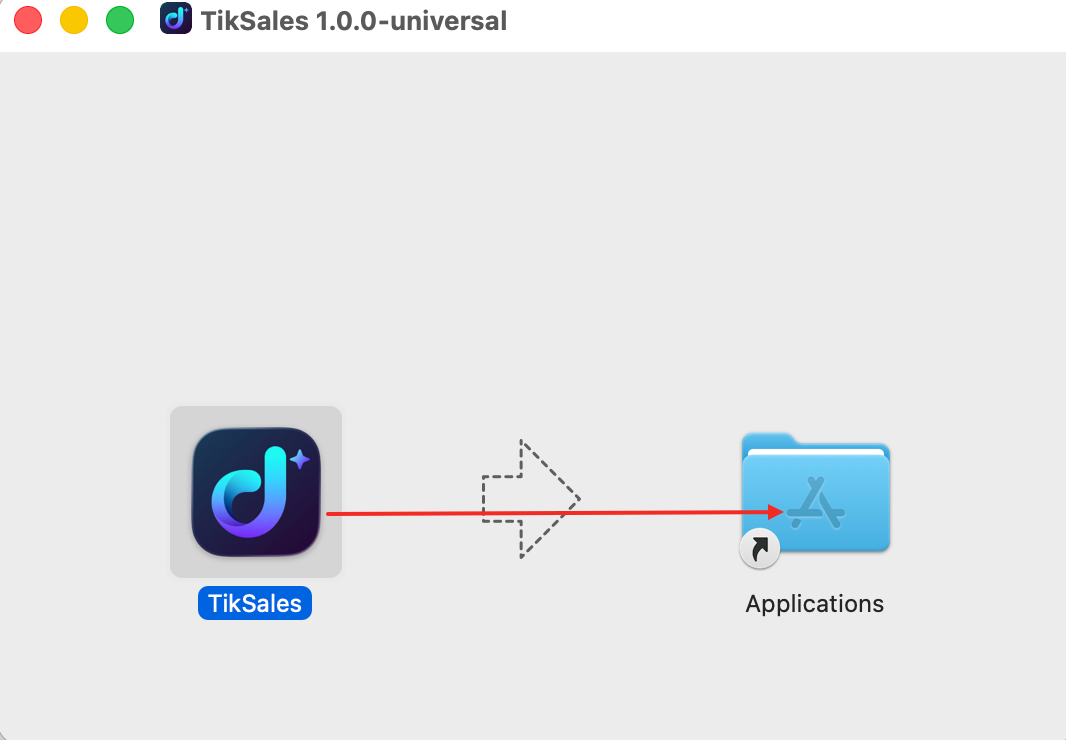
Download and install: Click “Download Now”. Once the download is complete, double-click the downloaded .dmg disk image file to open it. In the window that appears, drag the application icon to the Applications shortcut or folder on the right.
Q4: How do I download the TikSales Windows client?
Download Steps
Go to the TikSales downloads page.
Find the Windows Client.
Click “Download Now”
Once the download is complete, open the installer and follow the on-screen instructions.
Tip: Windows users do not need to choose between ARM64 and x64. Simply download the Windows client provided on the download page.
Q5: How do I download the TikSales Linux client?
Go to the TikSales downloads page.
Find the Linux Client.
Click “Download Now.”
Once the download is complete, install it according to your Linux system environment.